K Azwan
Showcase #1


I have always enjoyed photography. Just wishing that one day I can finally get that dream camera. Anyone got a second hand dSLR camera that you wanna sell? :-p
K Azwan

I think it’s good.

I have been evaluating the P1 W1MAX for more than 2 weeks already. And so far the connection and the reliability of the service has been satisfactory. I can safely say now that I am going to subscribe to P1’s W1MAX service as full time subscriber.

During the first week of my testing, the connection, or rather the coverage in my area was not that good. I was getting the orange light (means moderate coverage reception) all the time. But even with that orange light, the speed I’m getting was more than satisfactory. Pages loads quickly, downloads are fast, and the response was fast too. But after the second week, that’s when I’ve been getting the green light, about 90% of the time. And from then on, the speed is much faster and better reliability.I have been reading the unofficial forum thread regarding the P1 W1MAX here.

In the forum, I’ve learnt many tips on how to make the connection better, for instance, to point the modem towards the nearest coverage area. That means, if you’re on the borderline of the coverage area, you can still get a good signal reception. Of course, when using an internet line, you sure want to use it with more than 1 PC right? What’s good about the modem is that you can add a router to it so that you can share your internet connection with your friends and families. I want to share the internet connection, so I also bought a wireless router. One tip that you should remember when using a router is that, you must place the router as far as possible from the P1 modem. This is because some of the cheaper wireless routers tends to "leech" the wireless signal from the modem. This will cause slower transfer rate from the router to your PC. All this tips and info can also be found in the forum.

I was having problems with the transfer rate between the modem, router and my laptop. Only after I read the recommended tips from the forum that I find out to place the router as far away from the modem. I did that, and almost immediately the speed went up to the max. So now I have no problem sharing the connection with other users and still getting the fast internet connection.

Ok, lets check out the speed. Check out the screenshots below:


The speed from SpeedTest.net.

The speedtest shows 1199kbps as the download speed and 421kbps as the upload speed. It is considered fast as I have tested an internet connection using Streamyx (with 3.6Mb/s package) and it went up to only 900++ kbps.


373 KB/s download speed? Even I was shocked to see the speed.

Btw…that file took less than 40 seconds to download.

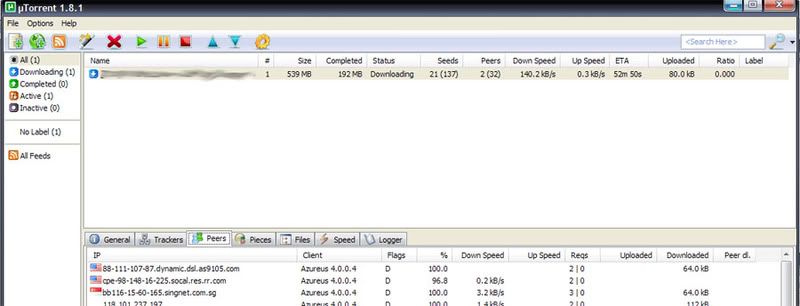
Now, I’m sure you also want to know how the torrent download speed is like right?


140.2 kb/s for a torrent download. Not bad.

And I thought the speed won’t be that high for torrent files on this P1 network.

Anyway, all I can say for the P1 W1MAX is that, I am happy. I am now your full time subscriber and I hope you can still improve on the area of coverage. The place I’m at now have a good reception, but in case if I go back to my parents place in Klang, I hope to have a good reception there too. And I’m also looking forward to its nationwide coverage in future. When that happens, I’m sure P1 will gain more subscribers.

Just keep up the good work.

I also want to know what others think of P1’s W!MAX service. I’m sure there’s a few negative statement on the WiMAX services. Good or bad, let’s share the experience with others.

Ads by AdGenta.com

K Azwan

I know it's only in the beginning of the year. But I already feel that I should take a break for a while. Year 2008 has been quite hectic for me. And I feel that before I power through 2009, I should at least re-charge myself with a nice holiday from it all.

Far-away-01

Nothing better than going back to Saratok, Sarawak.....or some tropical island is also nice. ;-)

K Azwan
I came across the band Estrella and the only thing I can comment about them is....superb! Not only they play great music, but I also think that their song "Stay" is more towards the international standard.

First time I heard the song Stay (without knowing who the singer was), I told myself that this is a cool, catchy and cute song. After knowing that the singer is Malaysian, and they are from a band called Estrella, that simply made me proud of them.

I pay high respect to the independent music band in Malaysia whom one of the band recently won the Juara Lagu, beating most of the already well known singers. Meet Uncle Hussein certainly deserved the award for their song "Lagu Untukmu", which also happens to be one of my favourites.

Now, I wish that the band Estrella can keep up their good work and bring up the standard of local music industry. I hope their song Stay can be heard in the international airwaves too.

Here's their song, Stay, for your listening (and viewing) pleasure...

K Azwan
That goes with my blog too. I have been blogging in my own hosted server and now it has been down for quite a while already. I don't know for how long more but I think I don't want to use my own hosted server anymore. I rather use the free blogging service by Blogger.com from now on. I want to use the free Wordpress blogging but unfortunately I can't add any javascript to run in the site. There goes the ads.

However, Blogger accepts the use of custom scripts to run in the site. Which is good for those who have Google Adsense running in their blogs...like me. I have to make money somehow right?

So, back to Blogger I go. I had another Blogger account last time, but I haven't been updating that one for quite a while. It was rather old already anyway.

So now, back to square one. Restart all the blog entries all over again. Good thing I kept a backup from my now disconnected blogsite (d2zone.net) and I still have ALL the blog entries. Too bad Blogger doesn't allow importing from a Wordpress platform, if that can be done, I'd be more than happy to import everything in here. That would save me lots of time. But then most of the photos won't be able to load as most of it are located in the hosted server. I knew I should have uploaded most, if not all of my photos to my Photobucket account instead. Oh well. Doesn't matter. I'll start up fresh again.


I hope nothing can lure me into getting a new hosting plan again. All those temptation of getting your own customized website really gets me excited. But, I will try and resist that...again.

Here's to the new beginning....cheers!
K Azwan
After one week of evaluating the Maxis Broadband, well, actually it was only for 4 days before I disconnect and give back the modem to Maxis centre, this weekend I had the chance of evaluating the P1 W1MAX service. I know that in my previous blog post, I did say that P1 W1MAX is not in my test list. But I decided to give it a shot.


Actually, I was just browsing around in PJ area on Friday and I saw the P1 guys were doing a promotion from a make-shift booth along the side walk. I was only asking for their current WiMAX coverage and whether my area is within their service area. And they said yes, Kota Damansara and Damansara Perdana are some of the new areas of coverage.

Without having to pay anything upon signing up, I thought what the heck, I've got nothing to lose. I signed up and got the modem immediately.

However, I would have to wait for about 12 hours or activation. Ok fine. I waited until Saturday morning. Still not activated, and I waited till evening about 4pm. By then Geena and I decide to go to a coffee hangout for the use of free WiFi. After that, I went home and tried to connect the WiMAX again, and this time I got connected. I was very happy to see the green light on the modem turned on. Although I only get the green light momentarily, the connection speed was quite good.


Most of the time, the LED signal indicator light shows the yellow light, which means moderate connectivity. If it's red, means low connectivity or almost none. If it's green, then it's full coverage.

The lights simply means:
  • red blinking = starting up,
  • yellow blinking = connecting,
  • green blinking = authenticating,
  • steady red light = no connection / limited,
  • steady yellow light = moderate connection,
  • steady green light = full / good connection.

About 90% of the time, I got the steady yellow light. Even with that, I managed to get good speed for my downloads and web browsing. I've yet to get the steady green light though. But yellow light is good, good enough to put P1 W1MAX way above Maxis Broadband, and maybe slightly above Celcom Broadband, just slightly.

I am quite happy with the P1 W1MAX for now although I get no response in connection after long use but the connection seems to come back, at least better than Maxis BB. Still needs few improvement in terms of signal strength in my area. I understand from the customer support that they are putting up a new transmission tower near my house area. That's good news.

Those who have tried the P1 W1MAX, please leave a comment or your opinion on the service. I’d like to know what you think of it.

Those who want to try it out, go ahead and try. You have 15 days to try it out for free anyway. If you don’t like it or no connection in your area, just give it back. You have nothing to lose.